
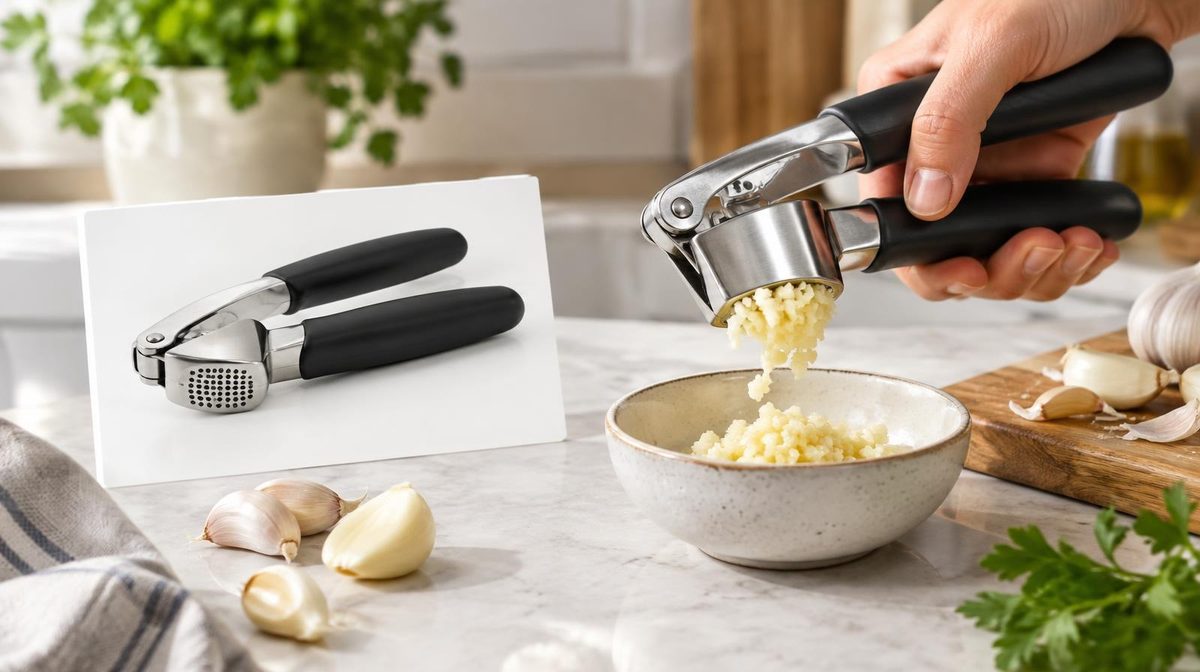
Priya was sure the new main image would win.
Her garlic press had a clean white-background shot, the kind every listing guide tells you to use. Her designer mocked up a second version: the press mid-squeeze, a clove visibly crushing through the grid, a small bowl of minced garlic beside it. It looked better. Everyone on her team agreed it looked better.
She almost swapped it in on a Tuesday and moved on. Instead she ran it through Amazon Manage Your Experiments for six weeks. The action shot won, with a 94% probability of being the better version and conversion rate up from 11.2% to 13.1%. Her ACoS on the same bids dropped from 29% to 25% without a single campaign change.
Here is the part she did not expect. Two months later she tested a "premium" title rewrite the team was equally confident about. It lost. Conversion fell by almost a full point. Had she swapped it in blind, she would have spent weeks cutting bids to chase an ACoS problem her own listing created.
That is what Amazon Manage Your Experiments is for: replacing "it looks better" with a number. This guide covers who can use it, what you can test, how to set up a test that produces a readable result, how to interpret what Amazon shows you, and why every winning test quietly raises the bid your campaigns can afford.
What Amazon Manage Your Experiments Is
Manage Your Experiments (MYE) is Amazon's free, built-in A/B testing tool for detail page content. You create two versions of one element on a listing, Amazon splits shoppers roughly 50/50 between them, and after the test ends it tells you which version sold more and how confident it is in that result.
Three things make it different from swapping content and "watching what happens":
- Simultaneous, not sequential: Both versions run at the same time, so seasonality, a competitor's coupon, or a Prime Day spike hits both groups equally. A before/after comparison cannot separate your change from everything else that moved that month.
- Split by shopper, not by visit: A given customer keeps seeing the same version throughout the test, which keeps the comparison clean.
- Real sales data: The result is measured in units, sales and conversion rate from actual purchases, not clicks on a mockup or opinions from a survey panel.
Amazon's own guidance says experiments can lift sales by up to 25%. Treat that as the ceiling, not the average. Most tests move conversion by a few percent, and plenty come back inconclusive. The value is in never shipping the version that would have cost you money.
Who Can Use It: Eligibility
MYE sits behind two gates.
- Brand Registry. You need an active Brand Registry enrollment and a role on the brand that can edit content. If you are not registered yet, MYE is one more reason on a long list.
- Enough traffic on the ASIN. Amazon only offers experiments on ASINs that have received enough recent traffic to reach a result in a reasonable time. It does not publish a hard threshold, and eligibility can change week to week. In practice, your top sellers qualify and your long tail does not.
To check, go to Brands → Manage Experiments in Seller Central and click Create a New Experiment. The ASIN picker only lists eligible products. If your hero ASIN is missing, the fix is traffic first, testing second.
What You Can Test
| Element | Where it shows | Typical impact | Also affects ads? |
|---|---|---|---|
| Main image | Search results, detail page, ads | Highest (CTR and CVR) | Yes, it is the ad creative |
| Product title | Search results, detail page, ads | High (CTR and CVR) | Yes, shown in Sponsored Products |
| A+ Content | Detail page, below the fold | Medium (CVR) | No |
| Bullet points | Detail page | Low to medium (CVR) | No |
| Product description | Detail page (non-A+ ASINs) | Low | No |
Available content types have expanded over time and vary by marketplace, so check the dropdown in your account.
Where to start: main image, then title. They are the only two elements a shopper sees before the click, so they move click-through rate and conversion rate at the same time. They are also the creative inside your Sponsored Products ads, which means a main image test is effectively an ad creative test with purchase data attached.
A+ Content is next. It shapes conversion for shoppers who scroll, and our A+ Content guide covers which modules tend to earn the lift. Bullet and description tests rarely justify the traffic they consume unless the current copy is weak.
How to Set Up an Experiment, Step by Step
- Pick the ASIN and the element. One ASIN, one content type. You can only run one experiment per content type on an ASIN at a time.
- Write a hypothesis before you build version B. "Shoppers can't tell the press handles garlic with the skin on, so showing it will raise conversion." A hypothesis tells you what to test next whether you win or lose. "Try a new photo" does not.
- Make version B meaningfully different. Changing a background from white to off-white will not produce a detectable result. Change the story the element tells: a new angle, a new lead benefit, a new first word in the title.
- Name it so you can find it in six months. Something like
GP-01 main image action-shot vs studio 2026-10. - Choose a duration. Amazon lets you pick a fixed window (4 to 10 weeks) or run until it reaches significance. We default to run to significance, minimum 4 weeks. Four weeks captures weekday/weekend patterns and pay cycles. A fixed 4-week window on a mid-traffic ASIN often ends inconclusive.
- Decide on auto-publish. Amazon can publish the winner automatically when the test ends. Turn this on only if you trust the hypothesis and have no pending listing changes. Otherwise review manually.
- Submit and wait for approval. Version B goes through the same content moderation as any listing update. The clock starts once both versions are live.
Then leave it alone. Every change to price, coupons, variation structure or other listing elements during the test adds noise to both groups and makes the result harder to trust.
How to Read the Results
When a test finishes, Amazon shows each version's units, sales, conversion rate, units sold per unique visitor and sample size, plus two numbers that matter most:
- Probability that one version is better: Amazon's Bayesian confidence that the winner genuinely outperforms, not just got lucky.
- Projected one-year impact: An estimate of the extra units and sales if you publish the winner for a year.
Our reading rules:
| Probability | What we do |
|---|---|
| 90% or higher | Publish the winner. Log the result. |
| 75% to 89% | Publish only if B is also the version you prefer for brand reasons. Otherwise rerun with a bolder B. |
| Below 75% | Inconclusive. Keep A. The change did not matter enough to detect. |
Two traps to avoid.
Do not treat the projected one-year number as a forecast. It extrapolates the test period across twelve months. Seasonal products, a competitor launch or a price change will break that projection. Use it to rank which wins mattered most, not to plan revenue.
Do not call a test early. Watching a leaderboard daily and stopping when B pulls ahead is the fastest way to publish a false winner. Early leads flip all the time on small samples. Set the duration, then look at the end.
Why Every Winning Test Lowers Your ACoS
This is the part most listing guides skip, and it is the reason a PPC tool company cares about A/B testing at all.
ACoS breaks down into three inputs:
ACoS = CPC ÷ (Conversion rate × Price)
Take a $34.99 product with a $1.20 CPC:
| Conversion rate | Revenue per click | ACoS |
|---|---|---|
| 10% | $3.50 | 34.3% |
| 11% | $3.85 | 31.2% |
| 12% | $4.20 | 28.6% |
Same bids, same keywords, same placements. Two points of conversion rate take six points off ACoS.
It works on the bid side too. If your break-even ACoS is 32%, your maximum profitable CPC is 32% × CVR × price:
- At 10% CVR: 0.32 × 0.10 × $34.99 = $1.12
- At 12% CVR: 0.32 × 0.12 × $34.99 = $1.34
A winning listing test raised the bid ceiling by 22 cents a click. That is the difference between sitting on page two for a competitive keyword and taking the top of search placement profitably. Conversion rate is the only lever that improves ACoS and ad position at the same time.
Main image and title tests add a second effect. They change ad click-through rate, and higher CTR feeds Amazon's expected-performance estimate in the auction. We covered the mechanics in how the Amazon PPC auction works.
💡 Daniks.AI Advantage: Daniks.AI recalculates bids from live conversion data, not a fixed rule. When a listing test lifts your conversion rate, the extra headroom flows into bids automatically at your ACoS target, so you capture the win in ad position instead of leaving it on the table. Try it free for 14 days.
How Tests Interact With Your Campaigns
A few practical notes from running experiments on actively advertised ASINs.
Ad traffic is split too. Shoppers who arrive from ads are assigned to A or B like everyone else. During a test, your campaign-level conversion rate is a blend of two listings. Do not make big bid decisions on the ASIN mid-test based on a sudden ACoS move. It may be the losing version dragging the blend down.
Keep ad spend stable. A huge budget increase in week three changes the traffic mix between weeks. Both groups still get the same mix, so the comparison survives, but results from a traffic mix you will not keep are less useful. Hold budgets roughly steady and let automation handle normal daily bid adjustments.
Avoid sale events. Tomás ran an A+ Content test on a camping lantern that spanned Prime Big Deal Days. Traffic tripled for four days with a completely different buyer mix: deal hunters who barely scrolled to A+ Content at all. The test came back at 58%, inconclusive. He reran it in a normal five-week window in November and got a clear 91% winner. If an event falls inside your window, extend the test or start after it.
Watch the Buy Box. If you lose the Buy Box during a test, neither version sells on the affected page views. Check the Featured Offer percentage in your Business Reports before trusting a result from a period with Buy Box trouble.
What to Test: A Prioritized Backlog
Run tests in this order on your top three ASINs by ad spend. Those are where a conversion point is worth the most money.
- Main image: studio vs in-use. The most common winning test we see. Show the product doing its job.
- Main image: product alone vs product with scale reference. Shoppers who can't judge size either bounce or buy and return. Our returns guide shows what that second outcome costs.
- Title: lead with brand vs lead with the core keyword. Amazon's title rules still apply, so both versions must be compliant.
- Title: long vs short. Mobile truncates hard. A 200-character title can hide the benefit that sells.
- A+ Content: comparison chart position. Top of the A+ module stack vs bottom.
- A+ Content: lifestyle-first vs feature-first.
- Bullets: benefit-led vs spec-led first line.
Each test takes four to ten weeks per content type. Because each content type has its own slot, you can run a main image test and an A+ Content test on the same ASIN in parallel. Plan a quarter at a time.
Keep a Test Log
Dana, who sells silicone baking mats, kept every result in a spreadsheet: ASIN, element, hypothesis, versions, dates, probability, conversion rates for both versions, and one line on what she learned. After eighteen months and twenty-two tests, a pattern was obvious. On her catalog, every image showing food on the mat beat every image of the mat alone. Every title test that led with "non-stick" beat the ones that led with "reusable."
She stopped testing those questions and started using the answers as defaults on new launches. Her new listings began at a conversion rate her older ones had needed three tests to reach.
The log is what turns individual tests into a playbook. Without it, you rerun the same experiments every year and argue about the same photos.
Common Mistakes
- Testing trivial differences. If a shopper would not notice the change, a test will not detect it. Go bold.
- Testing on a low-traffic ASIN. You wait ten weeks and learn nothing. Test where the traffic is.
- Changing other things mid-test. Price drops, new coupons, new bullets. Freeze the listing.
- Stopping at the first lead. Decide the duration up front.
- Ignoring losses. A losing test tells you what shoppers do not care about. Log it.
- Never following up on the PPC side. A 2-point conversion lift with unchanged bids is money left on the table. Revisit bid ceilings after every win, or let automation do it.
FAQ
Is Amazon Manage Your Experiments free?
Yes. There is no fee for running experiments. You need Brand Registry and an eligible ASIN.
How long should an Amazon A/B test run?
At least four weeks, and ideally until Amazon reports a result with high confidence. Amazon allows fixed windows of 4 to 10 weeks or a run-to-significance option.
Can I test price with Manage Your Experiments?
No. MYE tests content, not price. Price tests have to be run sequentially, which makes them far noisier.
Can I run more than one experiment on the same ASIN?
You can run one experiment per content type at a time. A main image test and an A+ Content test can run in parallel on the same ASIN.
Why is my ASIN not eligible?
Usually traffic. Amazon only offers experiments on ASINs with enough recent traffic to reach a result. Build traffic with advertising and listing basics first.
Does an experiment affect my search ranking?
Not directly. A winning version that converts better can support organic rank over time, because sales velocity feeds ranking. During the test, the split itself has no ranking penalty.
The Bottom Line
Every listing change is a bet. Amazon Manage Your Experiments lets you place that bet on half your traffic first, with real purchase data, for free.
Start with the main image on your highest-spend ASIN. Write a hypothesis, build a version B that tells a different story, run it for at least four weeks, and publish only what the data backs. Then carry the win through to your campaigns: a higher conversion rate means a higher profitable bid, better ad position and lower ACoS, all at once.
Ready to automate your Amazon PPC?
Daniks.AI turns every conversion win into smarter bids at your ACoS target, managing bids, budgets and keywords 24/7.
Start Your Free 14-Day Trial14-day free trial · Cancel anytime